 Mortgage, EMI & Loan Calculator
Microsoft Store · Windows 10 & 11
Mortgage Loan EMI Pro Insights See what your loan really costs. Pay it off years sooner.
Free mortgage, EMI and loan calculator for Windows. See your payment, full amortization schedule and charts, and what extra payments save. The core calculator is always free, with no account and no ads. Your data stays on your PC.
Core calculator always freeSchedule · Charts · Tools · No account · No ads

Mortgage and EMI calculator
Change the numbers to see your payment, and what paying a little extra each month saves.
This is the simplest case. The free Windows app adds the full schedule, charts, fees and property costs, floating rates and 12 decision tools.
Get it from Microsoft StoreResults are estimates for planning and education and are not financial advice. Check the final figures with your lender.
At a glance
Mortgage Loan EMI Pro Insights is a mortgage calculator, EMI calculator and loan calculator for Windows that shows what a loan really costs, and how to pay it off years sooner. The core calculator is always free: no account, no ads and no limit on how much you use it.
- What it is
- A mortgage, EMI and loan calculator for Windows, with a full amortization schedule, charts and 12 decision tools.
- Price
- The core calculator is free with no limit on use. Pro is an optional one-time purchase, not a subscription.
- Loans
- Mortgages and home loans, car loans and personal loans.
- Payments
- Monthly, biweekly, accelerated biweekly, weekly and quarterly.
- Exports
- CSV and chart images are free. Full PDF reports and Excel workbooks with live formulas are in Pro.
- Privacy
- No account, no ads and nothing uploaded. Every calculation works offline.
- Languages
- 23 languages and 28 currencies, with lakh and crore or million grouping.
- Requires
- Windows 10 version 1809 or later, or Windows 11. x86, x64 and ARM64.
- Where to get it
- Microsoft Store, product ID 9PFS2J56BJXR.
Everything you can calculate is free
No locked calculators and no limit on use. Pro is only for tracking a real loan and for advanced reports.
Mortgage, car & personal EMI
FREEPayment, total interest, true cost (APR) and payoff date, updated as you type.
Extra payment savings
FREEMonthly, yearly or one-off prepayments, and the interest and years they save.
Full amortization schedule
FREEEvery payment, month by month or by year. Export to CSV.
Interactive charts
FREEBalance, equity, interest and total cost. Save any chart as an image.
Compare 3 loans
FREESide by side with the cheapest one named. Keep 3 scenarios per loan type.
12 decision tools
FREERent or buy, refinance, prepay or invest, what you can afford and more.
Inflation: today's money
FREEWhat the loan really costs once prices rise. Few calculators show this.
Real-world detail
FREEFloating rates, fees, property tax, insurance, PMI, tax relief, step-up EMI.
My Loans tracking
PROLog payments, match your bank, get reminders. Several loans, co-borrowers.
Reports & live Excel
PROFull PDF report and Excel workbooks with live formulas. Unlimited scenarios.
Know the real numbers before you sign
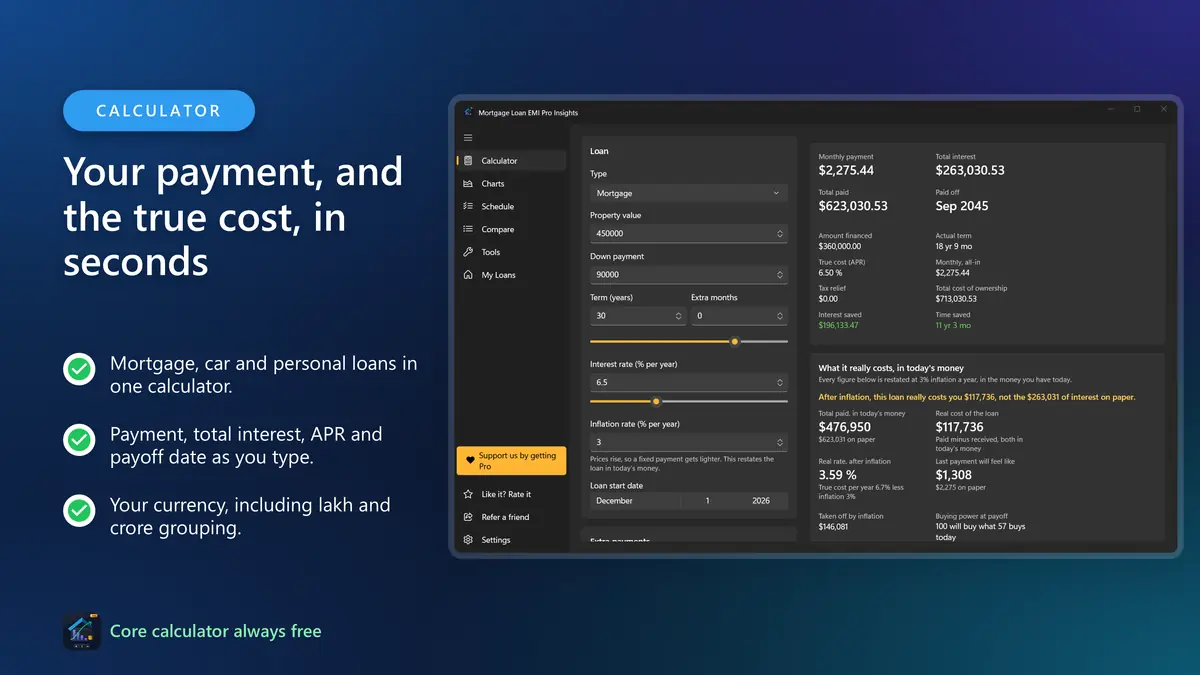
Your payment, and the true cost, in seconds
Enter the amount, rate and term to see your monthly payment, total interest, total paid, true cost (APR) and payoff date at once. Add property tax, home insurance, PMI, HOA and fees for the full monthly cost of owning a home. The results explain themselves in plain language, so you know what the numbers mean for you.
- Mortgage, car and personal loans in one calculator.
- Payment, total interest, APR and payoff date as you type.
- Your currency, including lakh and crore grouping.
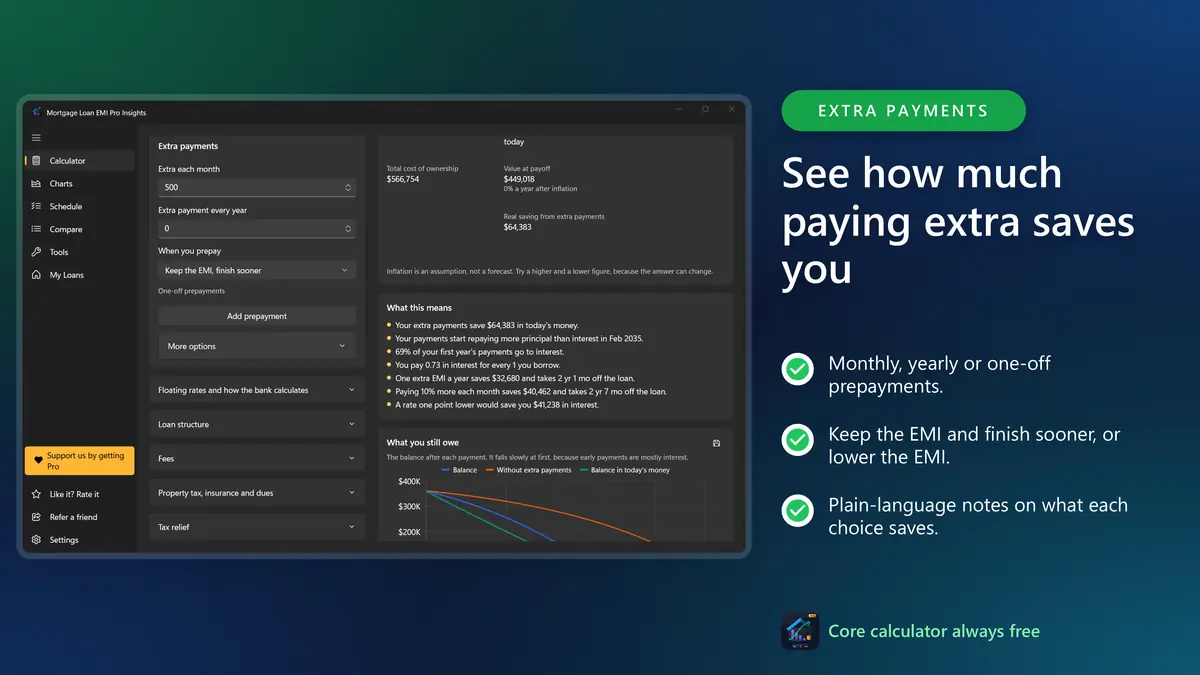
See how much paying extra saves you
This extra payment calculator shows the interest you save and the time you take off your mortgage. Add a monthly extra, a yearly lump sum or one-off prepayments, then choose to keep the EMI and finish sooner, or lower the EMI. Prepayment charges are included, so the saving you see is the saving you keep.
- Monthly, yearly or one-off prepayments.
- Keep the EMI and finish sooner, or lower the EMI.
- Plain-language notes on what each choice saves.

What your loan really costs after inflation
Inflation makes a fixed payment lighter every year. See the real interest rate, the real cost of the loan and what your last payment will feel like, restated in the money you have today. Few mortgage calculators show this.
- Every figure restated in the money you have today.
- See the real interest rate and real cost of the loan.
- Your last payment will feel far lighter than your first.
See every part of your loan
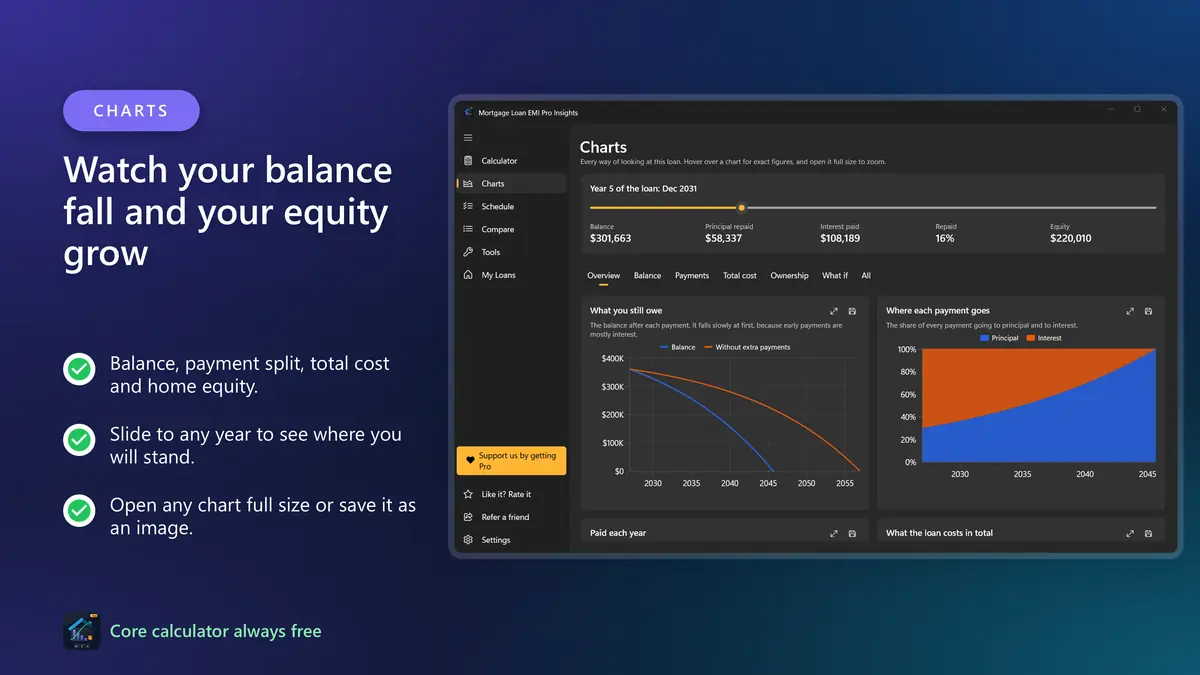
Watch your balance fall and your equity grow
- Balance, payment split, total cost and home equity.
- Slide to any year to see where you will stand.
- Open any chart full size or save it as an image.
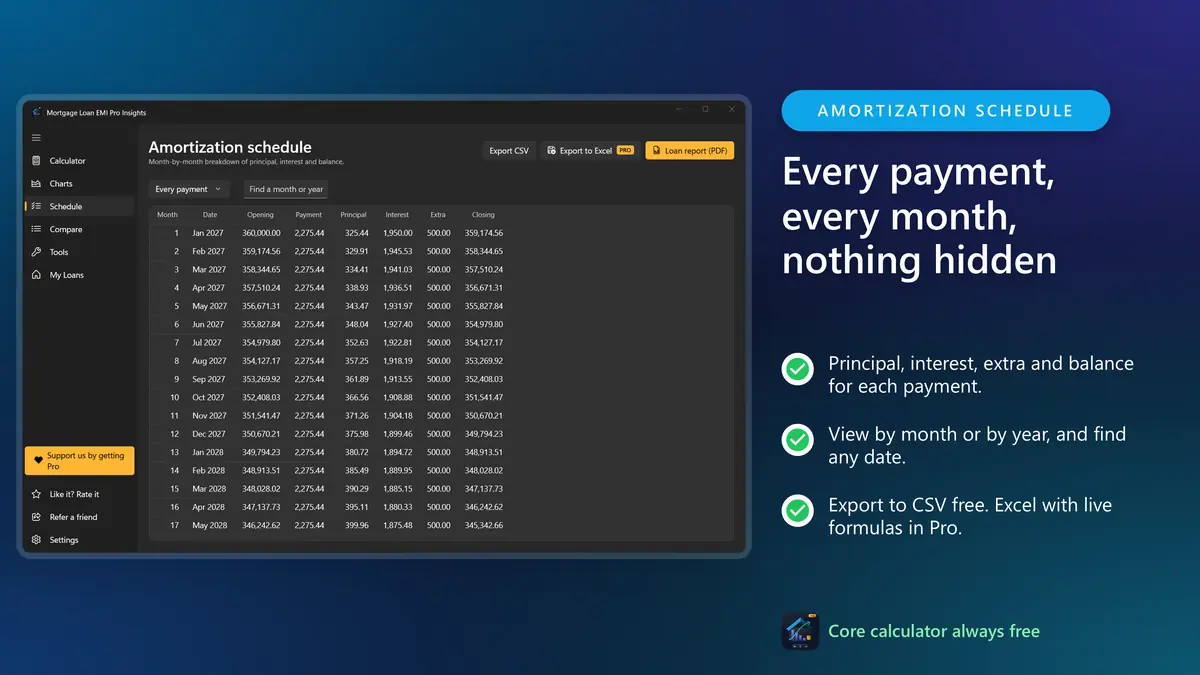
Every payment, every month, nothing hidden
- Principal, interest, extra and balance for each payment.
- View by month or by year, and find any date.
- Export to CSV free. Excel with live formulas in Pro.
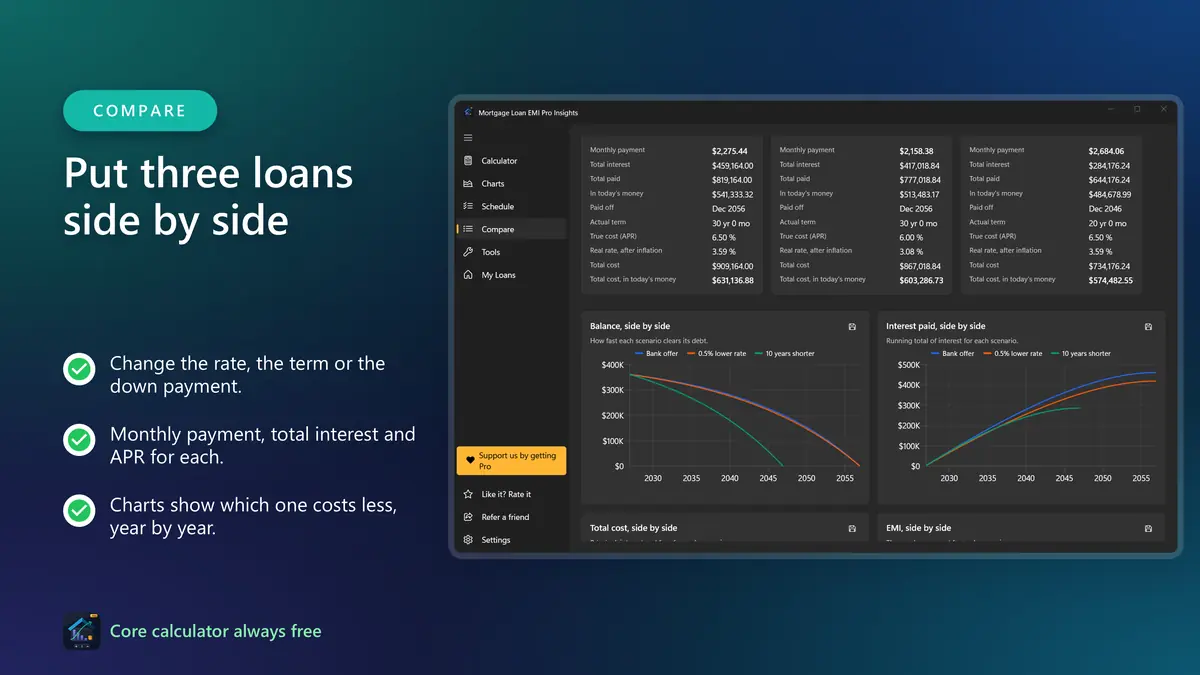
Put three loans side by side
- Change the rate, the term or the down payment.
- Monthly payment, total interest and APR for each.
- Charts show which one costs less, year by year.
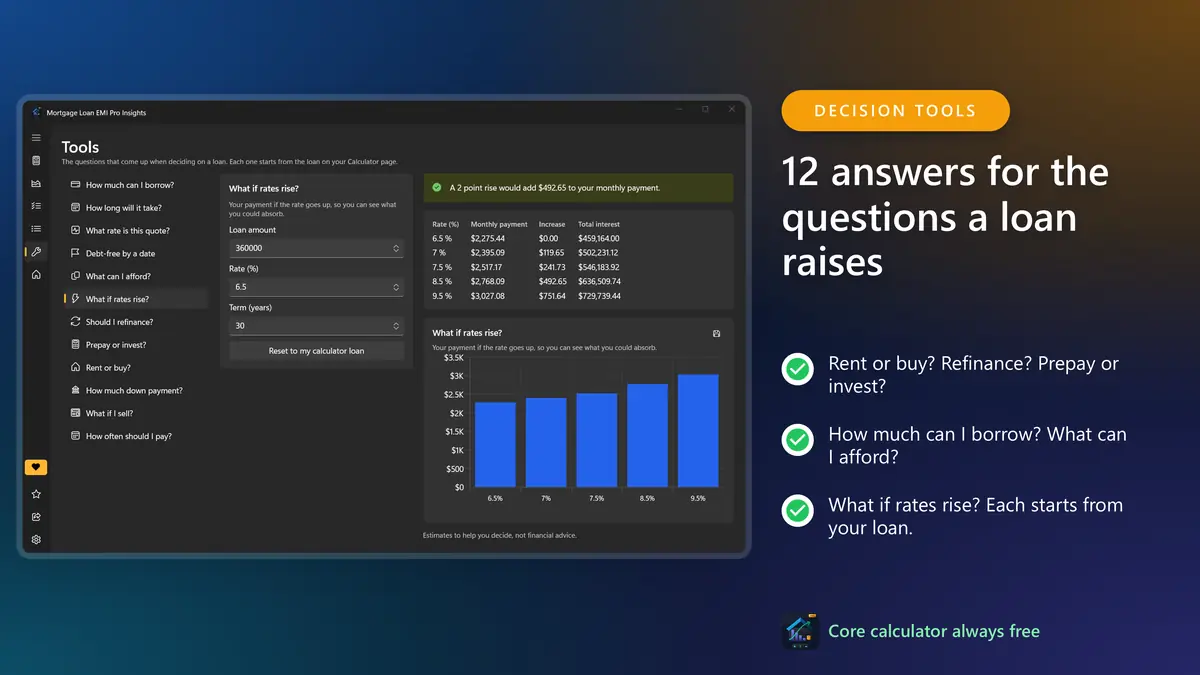
12 answers for the questions a loan raises
- Rent or buy? Refinance? Prepay or invest?
- How much can I borrow? What can I afford?
- What if rates rise? Each starts from your loan.
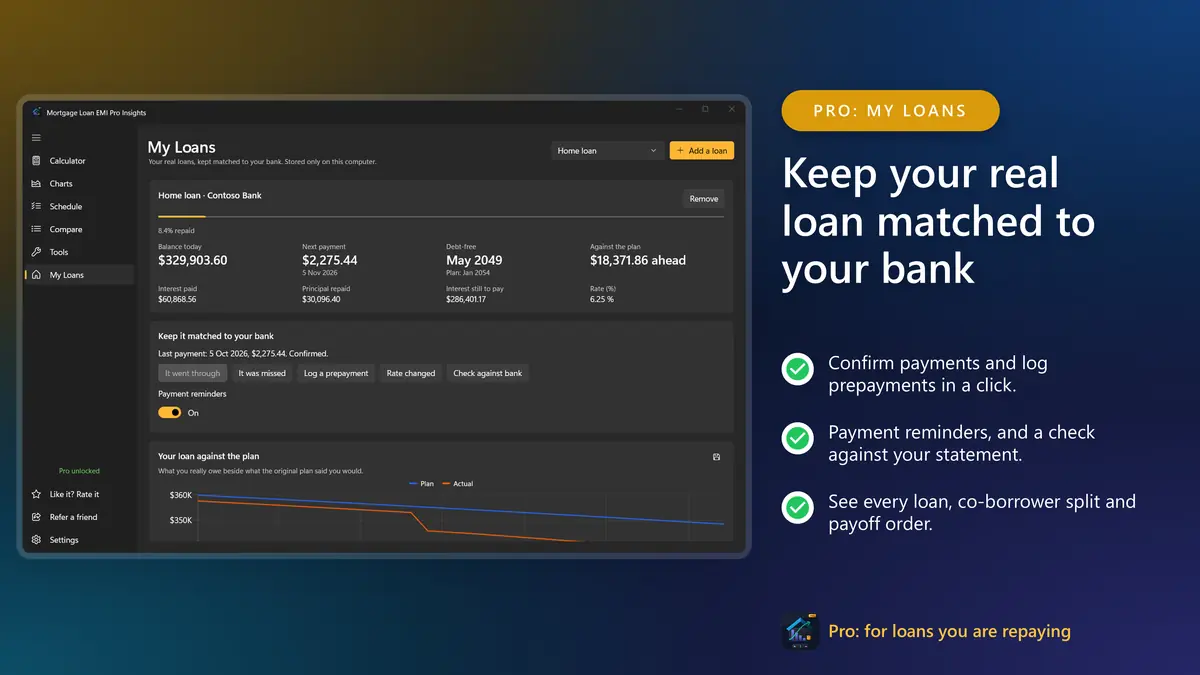
Keep your real loan matched to your bank
- Confirm payments and log prepayments in a click.
- Payment reminders, and a check against your statement.
- See every loan, co-borrower split and payoff order.
Core calculator always freeSchedule · Charts · Tools · No account · No ads
12 answers for the questions a loan raises
Rent or buy, refinance, prepay or invest, what you can afford and more.
How much can I borrow?
The loan a monthly payment can repay.
How long will it take?
How long a monthly payment takes to clear a loan.
What rate is this quote?
The real rate hidden in a quoted payment. Useful when a lender quotes an EMI but not a clear rate.
Debt-free by a date
What to pay extra each month to finish by your target.
What can I afford?
How much loan your income can carry, using the share of income lenders let debt take (DTI or FOIR).
What if rates rise?
Your payment if the rate goes up, so you can see what you could absorb.
Should I refinance?
Compares the rest of your loan with a new one, including costs. A lower payment from a longer term can still cost more overall.
Prepay or invest?
Puts the same money against the loan or into an investment, and compares wealth when the original loan would have ended.
Rent or buy?
Compares your net worth buying with renting and investing the difference, so both sides spend the same money.
How much down payment?
What each size of down payment does to your EMI and interest, and how long it takes to save.
What if I sell?
What you'd walk away with if you sold in a given year.
How often should I pay?
The same loan at each payment frequency.
One app for all of these
How it compares with the usual options
Websites and spreadsheets are fine for a quick number. This is what changes when you want the whole picture.
| What you get | Mortgage Loan EMI Pro Insights | Typical website calculator | Spreadsheet template |
|---|---|---|---|
| Works offline | Yes | No | Yes |
| No account and no ads | Yes | Partly | Yes |
| Your loan figures stay on your PC | Yes | Partly | Yes |
| Full amortization schedule with export | Yes | Partly | Partly |
| Monthly, yearly and one-off extra payments | Yes | Partly | Partly |
| Floating rates, step-up EMIs and moratoriums | Yes | No | Partly |
| The loan's real cost after inflation | Yes | No | No |
| 12 decision tools that start from your loan | Yes | Partly | No |
| Tracking a real loan against your bank (Pro) | Yes | No | Partly |
Yes Partly No
Based on typical free tools. Individual websites and templates vary.
Free to calculate. Pro for the loan you are repaying.
Pro is a one-time purchase, not a subscription. Nothing you can calculate needs it.
Core calculator
Free
Many calculators lock their useful parts. Here, everything you can calculate is free, including:
- Mortgage, home loan, car loan and personal loan EMI calculator
- Full amortization schedule, month by month or year by year, with CSV export
- Extra payment and prepayment calculator: monthly, yearly and one-off payments
- Interactive charts for balance, interest, total cost and home equity
- Compare 3 loans side by side, and keep 3 saved scenarios per loan type
- 12 decision tools, from rent or buy to refinance
- Inflation-adjusted figures, tax relief, fees and property costs
Pro Optional
One-time purchase
Pro is optional and nothing above needs it. It adds:
- My Loans tracking: confirm payments in a click, log prepayments and rate changes, and get payment reminders
- A check of your balance against your bank statement
- Several loans together, with the payoff order that saves the most, and consolidation
- Co-borrower splits and a yearly tax summary
- Full PDF decision reports and Excel workbooks with live formulas
- Unlimited saved scenarios, and lender offers ranked against your current loan
The Microsoft Store and the app show the price of Pro in your currency. If you bought the app while it had a price, you keep the Pro features at no extra cost.
Made for your bank, your country and your privacy
BUILT FOR HOW BANKS REALLY LEND
Floating and fixed-then-floating rates, interest-only periods, balloon payments, step-up and step-down EMIs, moratoriums and stage-by-stage payouts for a home under construction. Monthly, biweekly, accelerated biweekly, weekly and quarterly payments. Canadian semi-annual compounding and actual-day interest. Home appreciation, depreciation and equity tracking.
PRIVATE BY DESIGN
Your financial data stays on your PC. There is no account, no sign-in, no ads and nothing uploaded, and every calculation works offline.
Privacy PolicyMADE FOR EVERY COUNTRY
Available in 23 languages, with 28 currencies and both lakh/crore and million grouping. Light and dark themes.
For anyone with a loan, or about to take one
Buying a home
Work out what you can afford, how much to put down and the full monthly cost with tax, insurance and fees, before you talk to a lender.
Repaying a mortgage or EMI
See what each extra payment saves, and whether to keep the EMI and finish sooner or lower the EMI.
Comparing offers or refinancing
Put three loans side by side, find the real rate behind a quote and see when a refinance breaks even.
Car and personal loans
The same schedule, charts and prepayment tools work for any car loan or personal loan.
From numbers to a plan in three steps
Install it free
Get it from the Microsoft Store. There is no account to create and nothing to set up.
Enter your loan
Type the amount, rate and term. Your payment, total interest, APR and payoff date update as you type.
Try what changes it
Add extra payments, change the rate, compare offers or open a decision tool, all from the same loan.
Core calculator always freeSchedule · Charts · Tools · No account · No ads
Everything in the app
- Mortgage, EMI and loan calculator: mortgage, car and personal loans, with payment, total interest, APR and payoff date as you type. The core calculator is always free.
- Extra payment calculator: monthly, yearly and one-off prepayments, with the interest and years they save. Keep the EMI and finish sooner, or lower the EMI.
- Full amortization schedule: every payment by month or by year, with principal, interest, extra and balance. CSV export is free.
- 12 decision tools: rent or buy, refinance, prepay or invest, how much you can borrow and afford, what if rates rise, and more.
- Interactive charts: balance, payment split, total cost and home equity. Open any chart full size or save it as an image.
- Compare 3 loans side by side, with the cheapest named and charts by year. Keep 3 saved scenarios per loan type for free.
- Inflation-adjusted view: the real interest rate and real cost of a loan, restated in the money you have today.
- Real-world loan detail: floating rates, interest-only, balloon, step-up EMI, moratorium, stage payouts, fees, property tax, insurance, PMI and tax relief.
- Private by design: no account, no ads and nothing uploaded. Your data stays on your PC and every calculation works offline.
- 23 languages and 28 currencies, with lakh and crore or million grouping, and light and dark themes.
- Pro: My Loans tracking keeps a real loan matched to your bank, with payment logs, reminders, reconciliation, several loans and co-borrower splits.
- Pro: full PDF decision reports, Excel workbooks with live formulas, unlimited scenarios and lender offers ranked against your loan.
Frequently asked questions
See what your loan really costs. Pay it off years sooner.
Free mortgage, EMI and loan calculator for Windows. See your payment, full amortization schedule and charts, and what extra payments save. The core calculator is always free, with no account and no ads. Your data stays on your PC.
Core calculator always freeSchedule · Charts · Tools · No account · No ads
Results are estimates for planning and education and are not financial advice. Check the final figures with your lender.
