 MPP Viewer - Open MPP File, Gantt Chart & XER Viewer
Microsoft Store · Windows 10 & 11
PlanTell Open MPP files. All features free.
Open MPP files free, with every feature included: Gantt chart, critical path, network diagram, calendar and S-curve. Compare versions, run a schedule health check, print and save as PDF or Excel. Primavera P6 XER too. No sign-in, works offline.
All features freeEvery view, print and export · no time limit
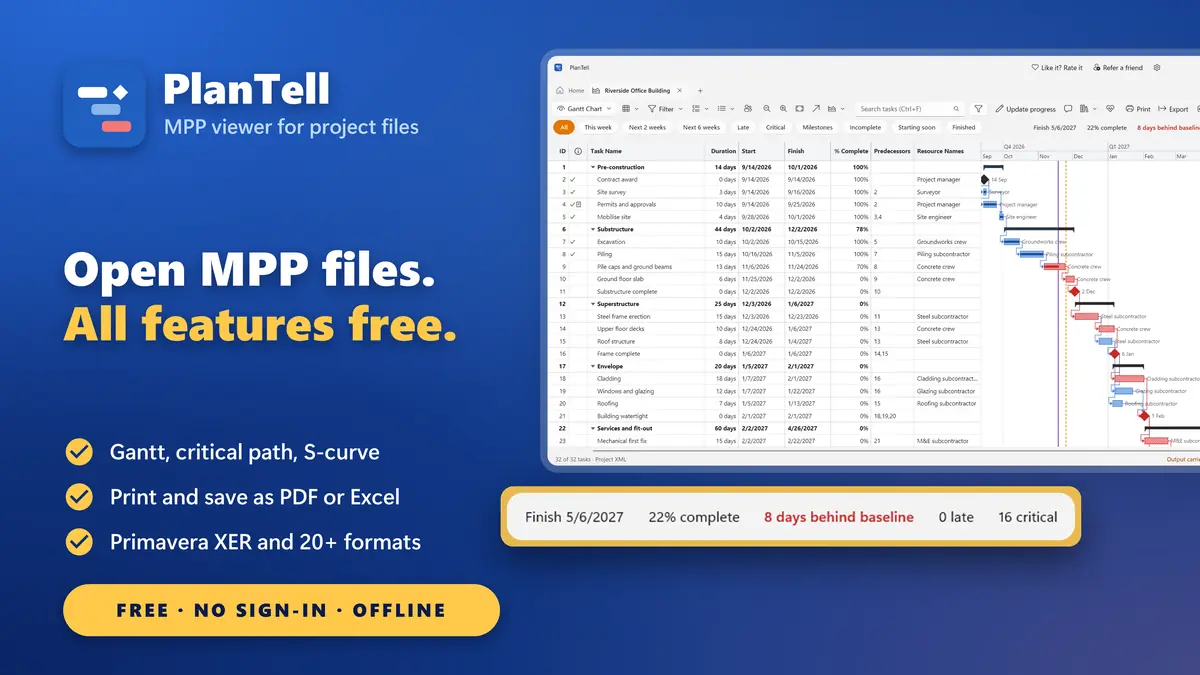
PlanTell at a glance
Open MPP files free, with every feature included. PlanTell is an MPP viewer and project file viewer for Windows: see the Gantt chart, critical path, network diagram, calendar, timeline, resource usage and S-curve, compare versions, check schedule health, print and save as PDF or Excel. It also opens Primavera P6 XER and more than 20 other schedule formats. No sign-in, no ads, and your plans never leave your PC.
- What it is
- An MPP viewer and project schedule viewer for Windows 10 and 11
- Opens
- MPP files from Project 98 to the latest version, MPT, MPX, Project XML, Primavera P6 XER and PMXML, and 20+ more
- Views
- Gantt with critical path, Tracking Gantt, network diagram, calendar, timeline, resource usage and S-curve
- Review tools
- One-click lookaheads, plan summary, 14-point health check, baseline variance and version compare
- Output
- Print A4 to A0, save as PDF, Excel, PowerPoint, images, HTML, calendar, Project XML or XER
- Price
- Every feature free with no time limit; optional Day Pass or Forever removes the small output label
- Privacy
- Works offline. No account, no sign-in, no ads, no tracking. Plans never leave your PC
- Runs on
- Windows 10 (version 1809 or later) and Windows 11, in 25 languages
How to open an MPP file without Microsoft Project
Three steps, under a minute, and nothing to sign up for.
Why .mpp files are hard to open
An .mpp file is the native format of Microsoft Project, which is paid software. Windows has no built-in viewer, Excel and Word cannot read it, and Project for the web can only import it as a new plan, losing resources. Online viewers make you upload the plan. PlanTell opens it directly on your PC, for free.
Install PlanTell
Get it free from the Microsoft Store. No account, no sign-in and no trial: every feature works from the first minute.
Open the .mpp file
Double-click the file, drag it onto PlanTell, or choose Open. MPP, MPX, Project XML and Primavera XER files all open the same way.
Read, filter, print
See the Gantt chart and critical path, use the Next 2 weeks or Late filters, then print or save the plan as PDF or Excel.
All features freeEvery view, print and export · no time limit
Everything you need to read a project plan
20+ file formats
MPP, MPX, Project XML, Primavera XER
Every view
Gantt, network, calendar, timeline
One-click filters
This week, next 2 weeks, late, critical
What changed
Compare two versions of a plan
Health check
14 checks, baseline variance, S-curve
Print and PDF
A4 to A0, Excel, PowerPoint, images
Update progress
Saved as a new XML file
Private and offline
No sign-in. Plans stay on your PC
See PlanTell at work
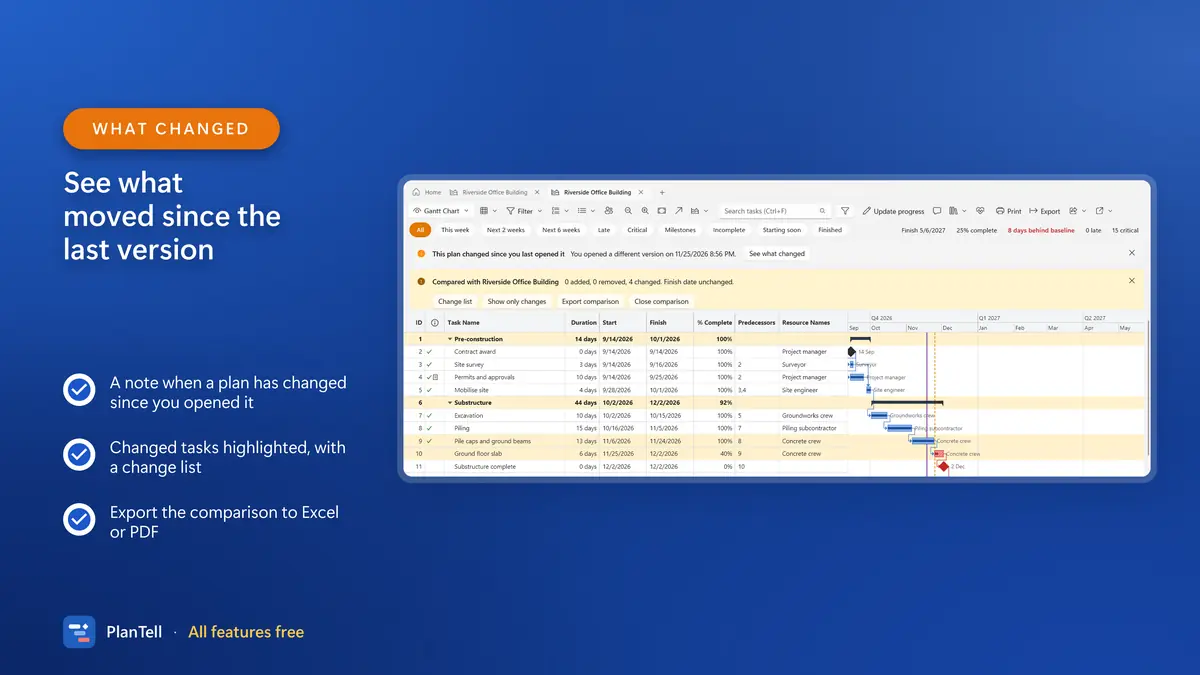
See what moved since the last version
- A note when a plan has changed since you opened it
- Changed tasks highlighted, with a change list
- Export the comparison to Excel or PDF
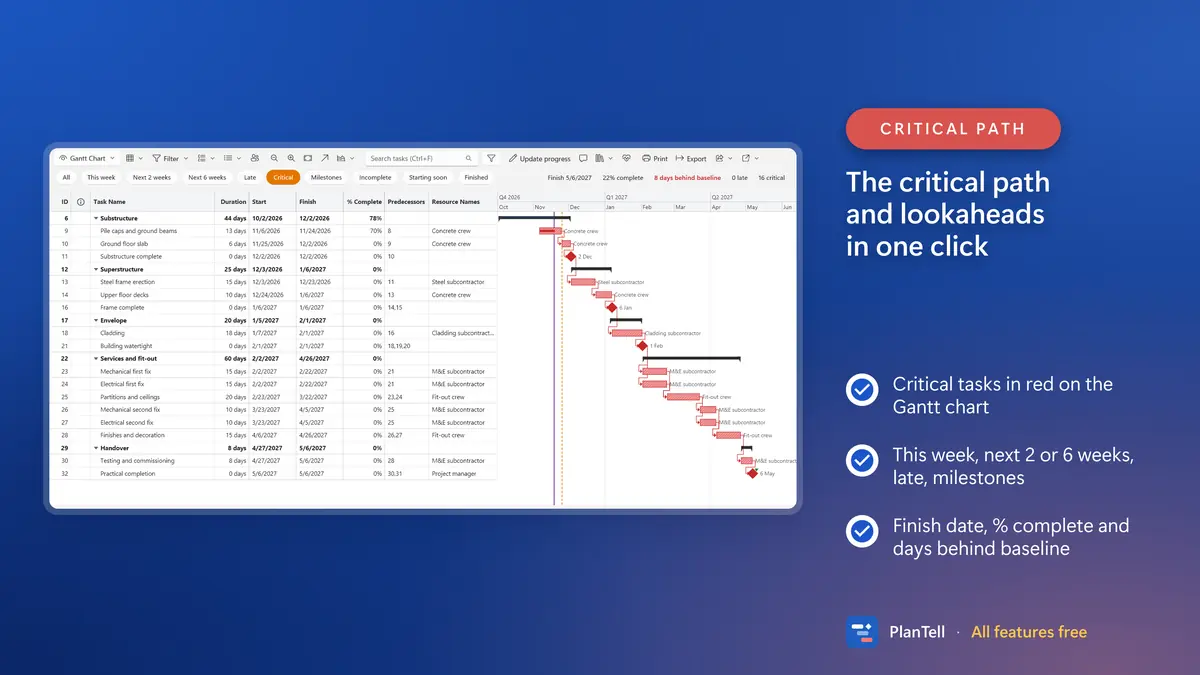
The critical path and lookaheads in one click
- Critical tasks in red on the Gantt chart
- This week, next 2 or 6 weeks, late, milestones
- Finish date, % complete and days behind baseline
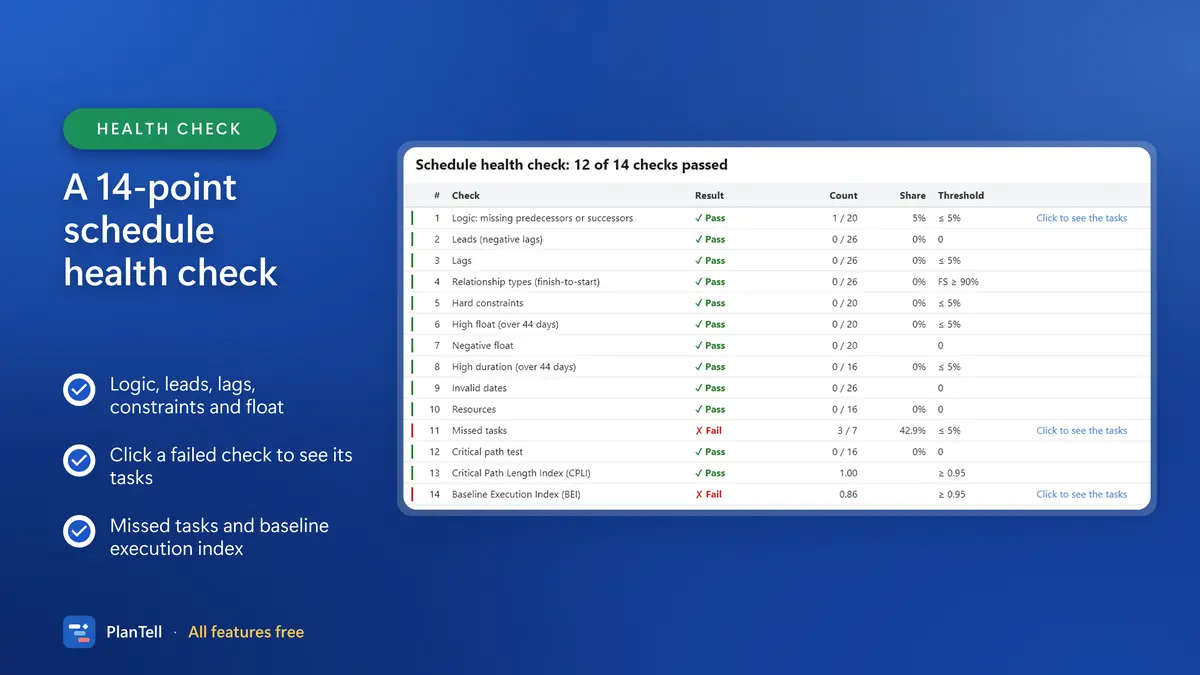
A 14-point schedule health check
- Logic, leads, lags, constraints and float
- Click a failed check to see its tasks
- Missed tasks and baseline execution index
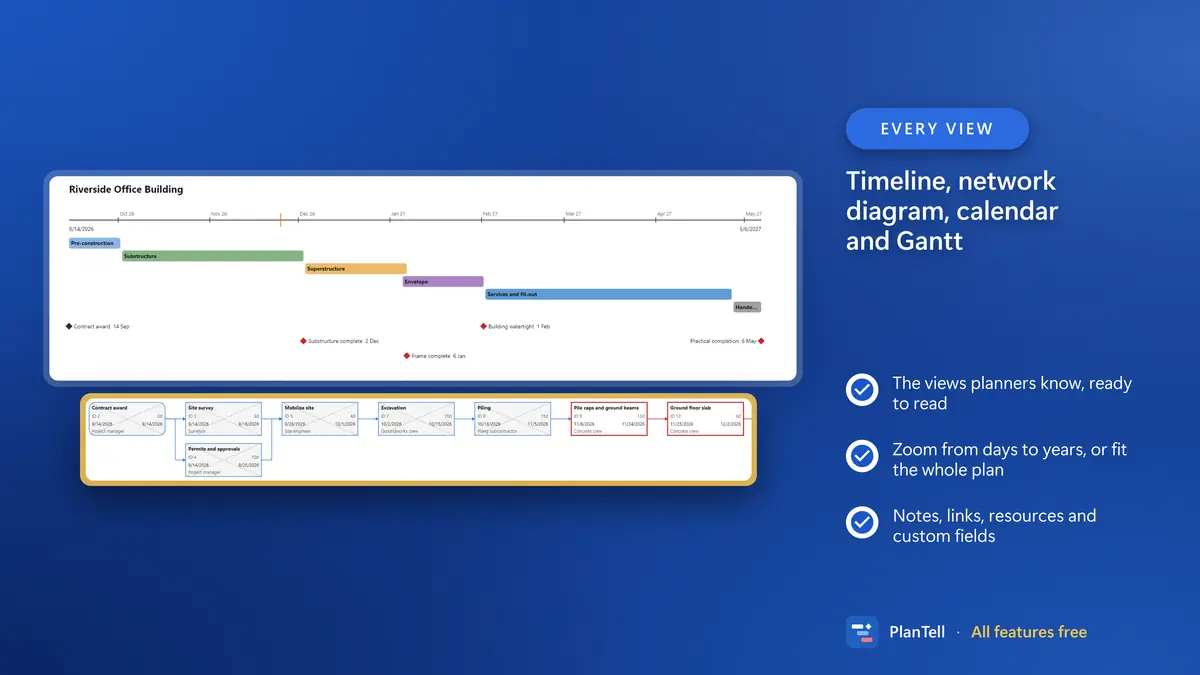
Timeline, network diagram, calendar and Gantt
- The views planners know, ready to read
- Zoom from days to years, or fit the whole plan
- Notes, links, resources and custom fields
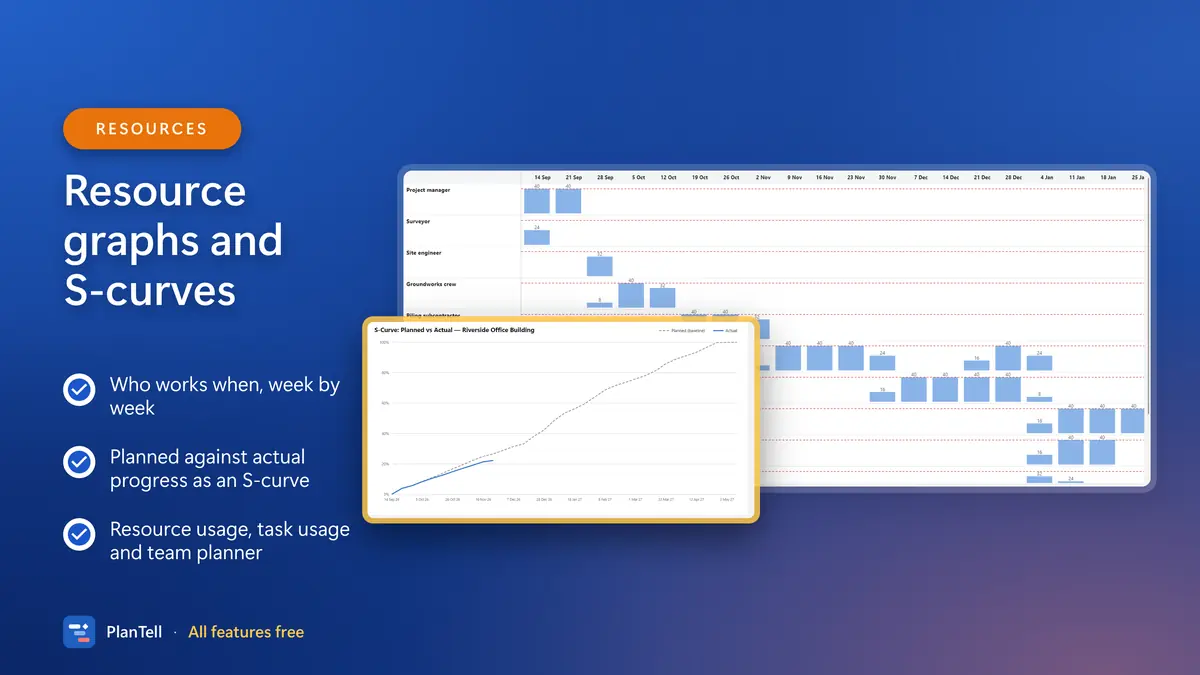
Resource graphs and S-curves
- Who works when, week by week
- Planned against actual progress as an S-curve
- Resource usage, task usage and team planner
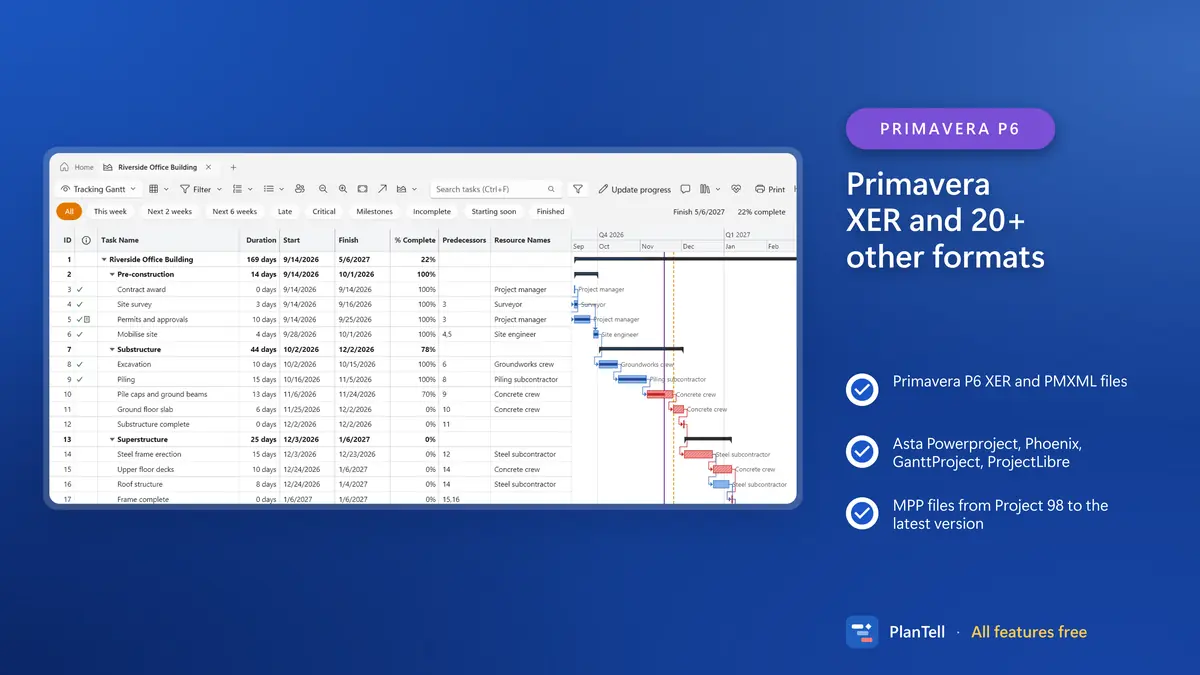
Primavera XER and 20+ other formats
- Primavera P6 XER and PMXML files
- Asta Powerproject, Phoenix, GanttProject, ProjectLibre
- MPP files from Project 98 to the latest version
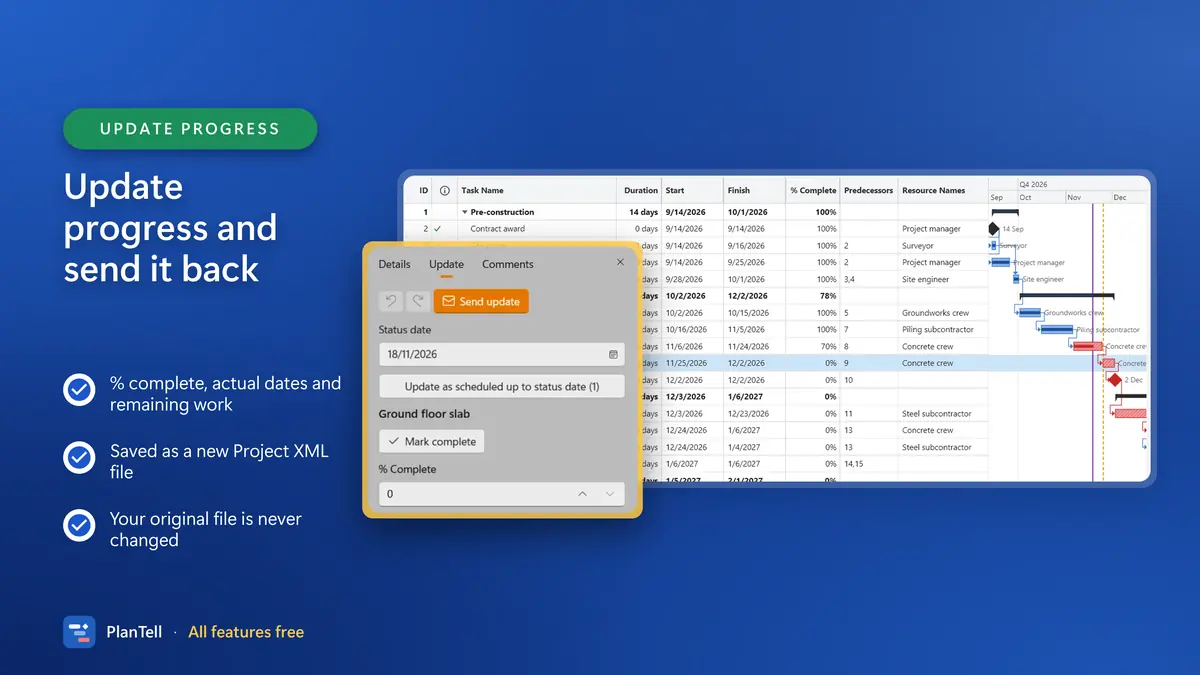
Update progress and send it back
- % complete, actual dates and remaining work
- Saved as a new Project XML file
- Your original file is never changed
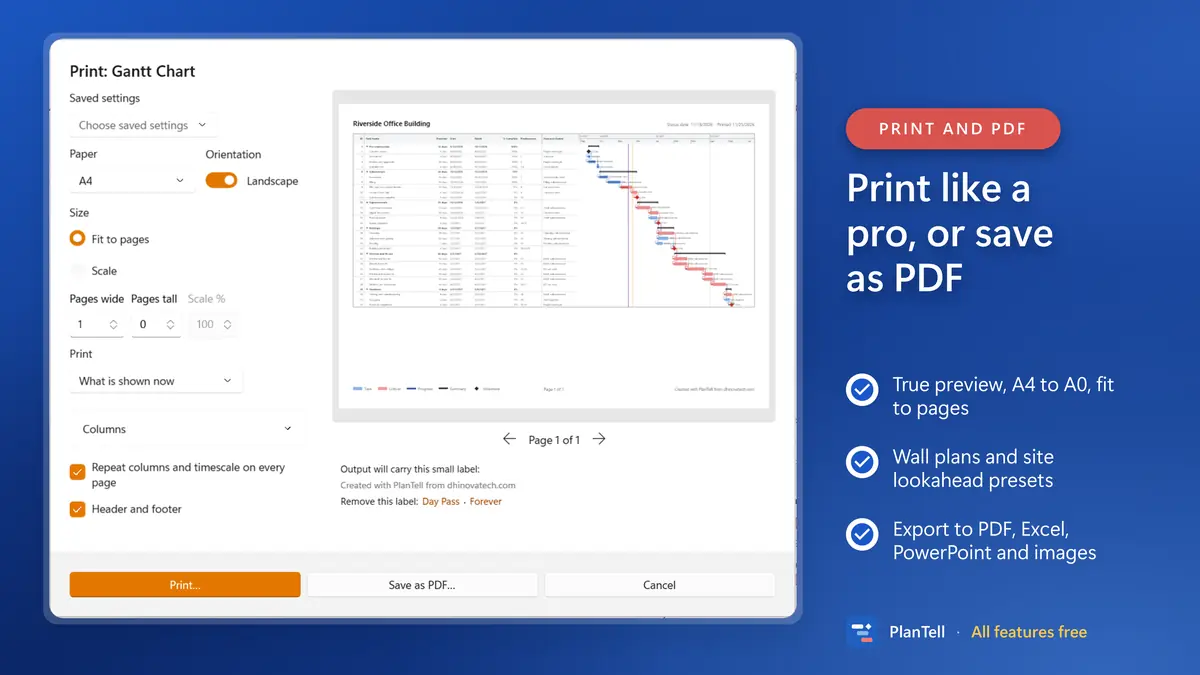
Print like a pro, or save as PDF
- True preview, A4 to A0, fit to pages
- Wall plans and site lookahead presets
- Export to PDF, Excel, PowerPoint and images
All features freeEvery view, print and export · no time limit
Every feature free, with no time limit
No trial and no subscription. Pay only if you want your output without the small PlanTell line.
PlanTell
Free
- Open MPP, Primavera XER and 20+ schedule formats
- Gantt, network diagram, calendar, timeline and resource views
- Lookahead filters, health check, S-curve and version compare
- Print A4 to A0 and save as PDF, Excel, PowerPoint and more
- Output carries a small line: "Created with PlanTell from dhinovatech.com"
Day Pass or Forever
Optional, in the Microsoft Store
- Day Pass: clean prints and exports for 24 hours
- Forever: clean prints and exports for good
- One-time purchases, no subscription, no account with us
- Nothing else changes: every feature is already free
EVERY FEATURE IS FREE
All views, filters, reports, comparisons, the health check, printing and every export are free, with no time limit. Printed and exported files carry a small line, "Created with PlanTell from dhinovatech.com". An optional Day Pass (24 hours) or Forever upgrade removes that line. Nothing else changes.
Prices are set per market and shown in the Microsoft Store before you buy. Without an add-on, every feature keeps working forever; only the small output line remains.
PlanTell vs Microsoft Project and online MPP viewers
The usual ways to open an .mpp file on Windows, side by side.
| What you need | PlanTell | Microsoft Project desktop | Project for the web / Planner | Online MPP viewers |
|---|---|---|---|---|
| Opens .mpp files | Yes, Project 98 to the latest version | Yes, the format's own app | Imports a copy as a new plan; resources are lost | Yes, after uploading |
| Cost | Free; optional add-on removes the output line | Paid licence or subscription | Needs a Microsoft 365 plan licence | Often free with limits, or a subscription |
| Your plan stays on your PC | Yes, never uploaded | Yes | No, stored in the cloud | No, uploaded to their server |
| Works offline | Yes | Yes | No | No |
| Print and save as PDF | A4 to A0, wall plans, PDF, Excel, PowerPoint | Yes | Limited | Varies |
| One-click lookaheads and health check | This week, next 2 or 6 weeks, late, critical; 14 checks | Build your own filters and reports | No | No |
Need to build and edit schedules every day? Microsoft Project is the tool for that. Need to open, read, check, print and share the plans other people send you? PlanTell does that free, and keeps your files on your PC.
Microsoft Project is a trademark of the Microsoft group of companies and Primavera is a trademark of Oracle. PlanTell is an independent app, not affiliated with either.
Made for everyone who receives project plans
Someone sent you an MPP file and you don't have the software it was made in? PlanTell opens it in seconds and shows it the way planners expect, with the same columns, bars and views. Made for site managers, contractors, clients, consultants and anyone who reviews project schedules.
Site managers and foremen
Open the contractor's programme on site, filter the next two weeks and print a lookahead for the morning meeting.
Clients and owners
Check the finish date, % complete and days behind baseline the moment the plan opens, without buying Project.
Subcontractors and suppliers
Find your own tasks, dates and milestones in a large MPP or XER schedule, then send progress back as Project XML.
Planners and reviewers
Run a 14-point health check, compare two versions and write review comments into a report.
Students and teachers
Open course and assignment MPP files on any Windows PC, free, without a Project licence.
Teams on Primavera P6
Read XER and PMXML exports in a familiar Gantt view, or save them as Project XML for colleagues.
Everything a planner expects
The same columns, bars and views as the software the plan was made in.
OPEN ALMOST ANY SCHEDULE
- MPP files from Project 98 to the latest version, plus MPT, MPX and Project XML
- Primavera P6 XER and PMXML, Primavera P3 and SureTrak
- Asta Powerproject, Phoenix Project Manager, GanttProject, ProjectLibre, Planner, Merlin and more
- Your original file is never changed
SEE THE PLAN YOUR WAY
- Gantt chart, Tracking Gantt and Detail Gantt with the critical path in red
- Network diagram, calendar, timeline, task sheet and team planner
- Resource sheet, resource usage, task usage and resource graph
- Notes, hyperlinks, custom fields and baselines
- Light and dark themes, 25 languages
FIND WHAT MATTERS FAST
- One-click filters: this week, next 2 weeks, next 6 weeks, late, critical, milestones
- A plan summary as soon as it opens: finish date, % complete, days behind baseline, next milestones
- Search, group, sort, outline levels and your own filters
REVIEW LIKE A PLANNER
- 14-point schedule health check (logic, leads, lags, constraints, float, missed tasks, CPLI, BEI)
- Baseline variance, S-curve of planned against actual progress, earned value
- What changed: compare two versions and see every added, removed and moved task
- Review comments on tasks and a review report
PRINT AND EXPORT
- True print preview, A4 to A0, Letter to Arch E, fit to pages, wall plans
- Save as PDF, Excel, CSV, PowerPoint, PNG, SVG, HTML and calendar files
- Save as Project XML, XER, PMXML or MPX to send the plan on
UPDATE PROGRESS
Enter % complete, actual dates and remaining work, then send the update as a new Project XML file. The original file is never touched.
Your plans never leave your PC
PlanTell works offline. No account, no sign-in, no ads, no tracking. Only the Store licence check uses the internet.
- Files are opened and read on your PC, never uploaded
- No account, no sign-in, no ads and no tracking
- Your original file is never changed; updates are saved as new files
- Only the Microsoft Store licence check uses the internet
Feature list
- Open MPP files from Project 98 to the latest version, plus MPT, MPX and Project XML
- Open Primavera P6 XER and PMXML, Asta Powerproject, GanttProject, ProjectLibre and more
- Every feature free: all views, filters, reports, print and export
- Gantt chart with the critical path and baselines
- Network diagram, calendar, timeline and team planner
- Resource usage, task usage and resource graph
- One-click filters: this week, next 2 or 6 weeks, late, critical, milestones
- Plan summary on open: finish date, % complete, days behind baseline
- 14-point schedule health check
- S-curve, baseline variance and earned value
- Compare two versions: what was added, removed or moved
- Print preview from A4 to A0, fit to pages, wall plans
- Save as PDF, Excel, PowerPoint, images, HTML and calendar
- Save as Project XML, Primavera XER, PMXML or MPX
- Update progress and send it as a new Project XML file
- Review comments on tasks and a review report
- The original file is never changed
- Works offline: no sign-in, no ads, no tracking
- Light and dark themes, 25 languages
Frequently asked questions
Open MPP files. All features free.
Open any .mpp or XER file in seconds, see it the way planners expect, and print or share it. Free, offline and private.
All features freeEvery view, print and export · no time limit